
Mail Migration Tool

Total Ratings: 443 - Average Rating: 4.8 out of 5
  • Transfer emails between IMAP Servers with attachments
  • Date Range and other filters for desired items migration
  • Supports all IMAP enabled email accounts
  • Provide you complete data migration report
  • Provision to migrate selected email folders from IMAP to IMAP
  • No additional tool or info. needed except IMAP Server credentials
  • Keep folder & subfolder structure organized throughout and after the migration
  • Suitable with different versions of Windows – 10/8/7/Vista/XP

Key highlights of IMAP Migration Tool

feature icon

Migrate mailboxes between IMAP Servers

The IMAP Mail Migration Tool is designed to transfer mailbox folders between IMAP Mail Servers or IMAP configured email accounts. All you need to do is enter credentials of source IMAP and targeted IMAP Server and then select data for migration.
feature icon

Date & email based filters

This feature is very useful for users by which users can move only necessary items from one IMAP Server to another IMAP Server. Users can filter the data on date-range basis or on to, cc, bcc, from, subject, etc. to migrate to destined IMAP Server.

feature icon

Complete mailbox migration

IMAP Email Migration Tool can easily migrate all emails folders like Inbox, Outbox, Drafts, Trash, Customized, etc. from source IMAP Server to targeted IMAP Server. Including email properties and attachments, the data is safely migrated in a few clicks.

feature icon

Keep data structure same

When you perform mailbox migration between IMAP Servers, you don’t need to take tension of folder & subfolder structure, email formatting, etc. as the software completely takes care of every single information throughout the process of migration.

feature icon

Support all IMAP Mail Servers

The best part of this application is you can utilize it for all IMAP Servers. It can smartly migrate data between all IMAP Server accounts including Gmail, G Suite, Office 365, Zoho Mail, AOL, and various others without creating any trouble.

feature icon

Generate Migration Report

The software keeps a record of the complete migration process. Once the mailbox migration process is over, it generates a report containing full details of data transfer. The report is available in Text file format and users can check the status of the migration with it.

Frequently Asked Questions

Yes, the attachments with every email message are successfully transferred between IMAP Servers.
Yes, the software comfortably works with almost all versions of Windows OS including Windows 10, 8.1, 8, 7, and others.

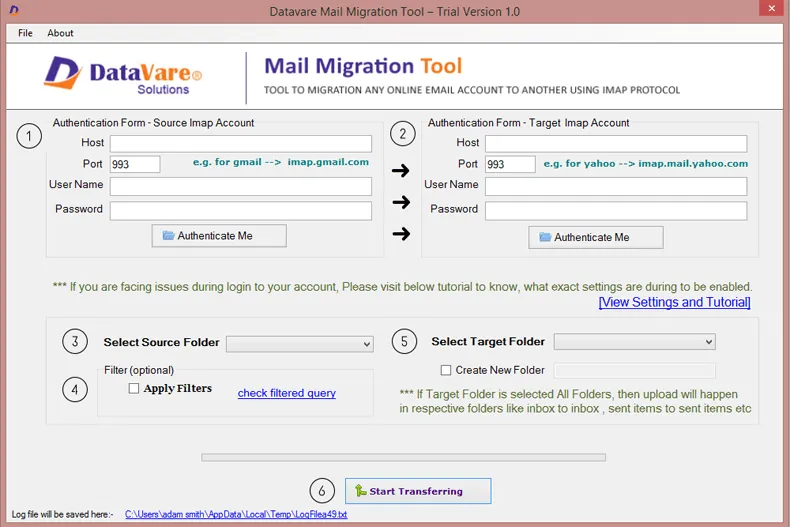
Only a few simple steps are there for the mailbox migration

  1. Install and start IMAP to IMAP Migration software
  2. Provide login details of source IMAP account
  3. Now, enter login details of the targeted IMAP account
  4. Select email folder and use advanced filters for the selective items transfer
  5. Choose the folder of targeted account for data import
  6. Hit Start Transferring button and this begins the mailbox migration process
Yes, all IMAP Mail Servers are supported by this application. You can simply migrate mailboxes between any two IMAP Servers at one time.

Software Specifications

System Requirements

Processor Any Pentium Class
Operating System Windows 11, 10, 8.1, 8, 7 & Other
Memory 512 MB Minimum
Hard Disk 100 MB of free space for software installation

Software Delivery

Electronic Via Email
Minutes 15

Interface Available

Language Supported English
Support Option Emails, Chat & Skype

Software Screenshots

Mail migration Tool
Mail migration Tool

What Clients Say

I am very excited to have such a brilliant application that serves multiple tasks. It becomes too simple to migrate data between any IMAP Servers with this one investment. Many Thanks to the team.

The performance and ease of access to this application showed that it has been designed by analyzing the requirements of users. That’s why I found all the expected features in this application. Truly, a trust-worthy program