IMAP Backup

Total Ratings: 284 - Average Rating: 4.8 out of 5
  • Download emails from IMAP Server to PC
  • Batch mode to export emails from IMAP Server Account
  • Multiple output options – PST, MSG, EML, EMLX, MBOX, HTML, PDF, and MHTML
  • Facility to export selected folder from IMAP Server to computer
  • Embed attachments with emails export
  • Backup emails of multiple IMAP Server accounts
  • Simply connect with IMAP Server and export emails in a few clicks
  • No modification to email attributes and data structure
  • Intuitive interface for easy handling without technical knowledge

Key characteristics of IMAP Mail Backup Software

features icon

Backup IMAP Mailbox in batch

This program is specialized in converting MBOX to EML only. It allows you to export MBOX files of any size. You can export MBOX databases created in Thunderbird, Entourage, PocoMail and any other email clients. The utility doesn't cause any interruption during migration.
features icon

Export emails of many IMAP Servers

This IMAP Mailbox Backup Tool downloads emails from various IMAP Servers like Gmail, G Suite, Office 365, AOL, and others. The emails can be simply downloaded by the tool by asking IMAP host, IMAP Server username, and password.

features icon

Export selected Email folders of IMAP

Once you enter login details of desired IMAP Server account, you can choose specific email folder to save in local PC. Users can easily select all folders if they want. The software is capable to export all folders as there are no size restrictions.

features icon

Simple to utilize for all

All technical and non-technical users can easily handle this software without difficulties as it is designed with simple GUI. The self-expressive steps and manual guide is also there to help users. Or, users can connect to our support team 24*7.

features icon

Export IMAP Emails to varied formats

The utility allows users to choose any file format in which they want to save the backup of IMAP Server. Multiple saving options are provided by this application such as PST, EML, EMLX, MBOX, HTML, MHTML, and PDF format.

features icon

Secure IMAP Mail Backup

The IMAP Mailbox Backup Tool is absolutely secure. It does not affect the hierarchy and structure of mailboxes during and after the backup. The entire data is safely downloaded with its metadata and email properties.

Frequently Asked Questions

Follow the steps to backup IMAP mailboxes to PST format

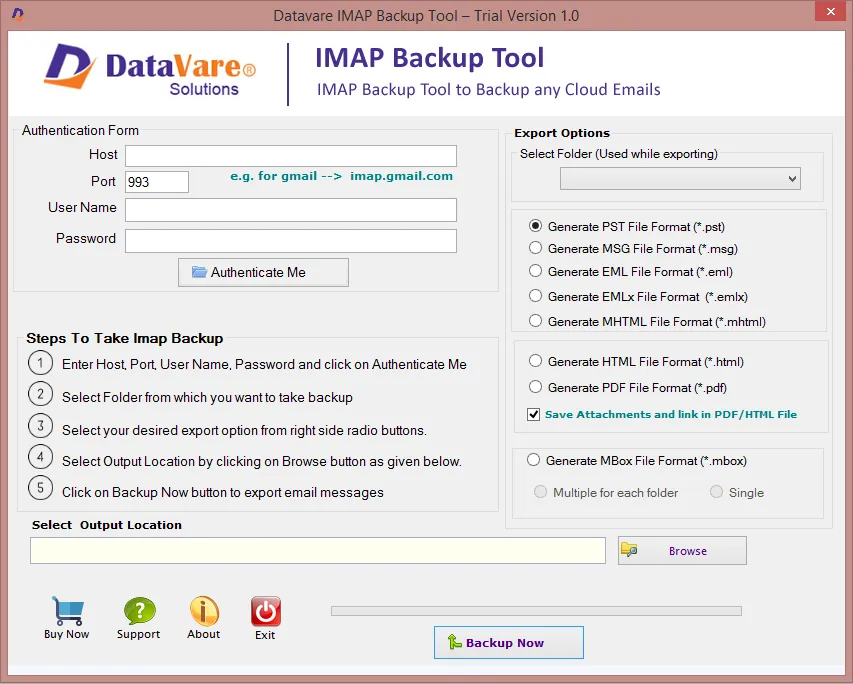
  1. Download and Launch IMAP Backup Software.
  2. Provide IMAP Server login details like host address, username and password.
  3. Choose the folder of IMAP Server account
  4. Select PST format under Export options
  5. Use the Browse button and select location for the resultant file
  6. Hit Backup Now button and this export IMAP Server emails to PST format.

Yes, choose MBOX format among Backup Export options, and your IMAP Server emails are exported easily into Thunderbird.
Yes, the tool provides an option to users for selecting desired folders to export IMAP Mailboxes to local system.
No, there is no requirement of Outlook or any other tool to export emails from IMAP Server to PST format.

Software Specifications

System Requirements

Processor Any Pentium Class
Operating System Windows 11, 10, 8.1, 8, 7 & Other
Memory 512 MB Minimum
Hard Disk 100 MB of free space for software installation

Software Delivery

Electronic Via Email
Minutes 15

Interface Available

Language Supported English
Support Option Emails, Chat & Skype

Software Screenshots

Imap Backup Expert software interface screenshot showing conversion process
Imap Backup Expert Interface

What Clients Say

A big thanks to Datavare developers for providing this all-in-one utility to backup IMAP Mail Servers. I love the quick performance and easy interface of this application.

Wow! An incredible solution to backup IMAP emails locally in multiple file formats. Many thanks to the whole team for their valuable efforts.