
Google Apps Backup Expert

Total Ratings: 233 - Average Rating: 4.9 out of 5
  • Capable to store entire Google App data to PST/MSG
  • Enable conversion of Google App to EML/EMLX/MBOX
  • Fast conversion assistance
  • Work with top accuracy by transferring all the components
  • Capable to scan and export desirable Google App accounts
  • Controlled by users to provide accurate backup results
  • A Windows utility, supports Wins 11/10/8/7/XP/Vista

Key Features of Google App Backup Application

feature icon

Google App to PST/MSG

The smart application has been designed to read and transfer entire Google App data to Outlook by offering two unique platforms- PST and MSG. Users have freedom to choose any of these file extensions. The transferred data can be open with all Outlook versions.
feature icon

Google App to EML/MBOX

The backup software enables you to export entire Google App to Thunderbird, WLM, Entourage, Apple Mail and several other email clients by exporting Google Apps to EML or Google Apps to MBOX. Choose any of these given file extensions to easily access Google Apps to multiple email clients.

feature icon

Target the Particular Google App Account

To backup a particular Google App account, it is necessary to know the correct User ID and Password of the particular account. The software takes no time to connect with the particular account if the given information is correct.

feature icon

Backup Entire Data

The Google App Exporter restores entire data of Google App to PST. For this all you need to instruct the software. You can able to get export any folder, document, image and address of Google Apps. It doesn't take much time to restore data.

feature icon

Save Resultants Locally

Every resultants folder is saved locally. The tool gives flexibility to choose any desirable space in the local system to save data. It can be any folder of your choice. The process doesn't take much time. It offers organized backup process.

Frequently Asked Question

It is capable to read and export data of any Google App account when you know their correct password and User ID.
No any additional software it needs to export data.
Export one account data at a time.

Software Specifications

System Requirements

Processor Any Pentium Class
Operating System Windows 11, 10, 8.1, 8, 7 & Other
Memory 512 MB Minimum
Hard Disk 100 MB of free space for software installation

Software Delivery

Electronic Via Email
Minutes 15

Interface Available

Language Supported English
Support Option Emails, Chat & Skype

Software Screenshots

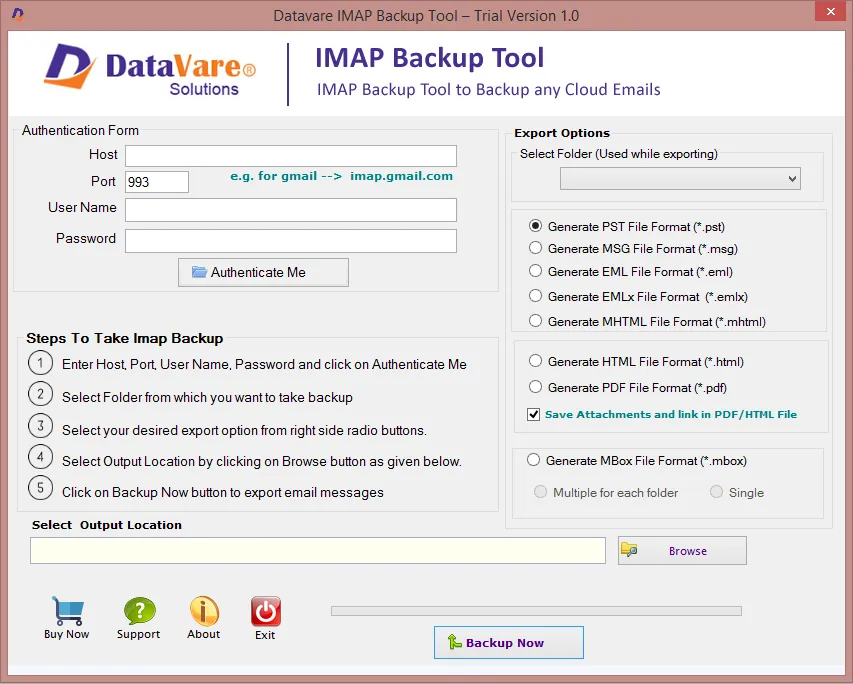
Google Apps Backup Converter Expert software interface screenshot showing conversion process
Google Apps Backup Converter Expert Interface

What Clients Say

One of my friends told me that a third app can help to safely export Google Apps to Thunderbird. After just 2-3 search processes, I came across your app. At first glance the cloud conversion program looks so simple. But after using it just 2-3 times, I realized its magical migration speed.

This app really works so well. I have practically tried it more than 40 times and each time the result accuracy is remarkable. I am impressed with its smooth backup process.