MSG to VCF Converter Expert

Total Ratings: 455 - Average Rating: 4.8 out of 5
  • An advanced conversion program with simple wizard
  • Accurate conversion of entire MSG data to VCF file format
  • Convert all the contacts of MSG to VCF
  • Export desirable MSG file data to VCF
  • Migrate single or multiple Outlook MSG files to support batch migration
  • Create one single strong VCF folder for multiple MSG files
  • No file size limitation, tested on multiple samples
  • An independent utility.
  • Read or scan MSG files created in any Outlook versions including 2003/2007/2010/2013/2016/2019/2021
  • A Windows utility; supports Wins 7/8/10/11/XP/Vista

Key Attractive Features of MSG to VCF Exporter

features

Export only MSG to VCF

Only MSG files are selected for conversion to VCF. The utility is capable to select MSG files of any size. All Outlook for Windows versions are supported including 2003, 2007, 2010, 2013, 2016, 2019, and 2021. Advanced and accurate conversion results are provided each time.
features

Convert Contacts in Batch Mode

Not just one but also multiple MSG files can be selected for migration. It extracts contacts of multiple MSG files at once to save in VCF file format. One strong VCF folder is created by the app. With batch conversion, the tool saves conversion time.

features

Support All vCard Based Email Clients

As you convert MSG to VCF, the resultant databases can be accessed to all VCF supportive email clients including MS Outlook, IBM Lotus Notes, Apple Mail, Outlook Express, iPhone and several types of smart phones. It means you can access all your important Outlook contacts flexibly to any email client.

features

Advance File Filter Options

You can select MSG files one by one. If you want to select multiple MSG files at once, browse by folder. Select a folder holding MSG files. The tool takes no time to download all MSG files stored in a folder. The feature allows you to select only desirable MSG files.

features

Save All Contact Details

The MSG to VCF Exporter is an advanced utility. It converts entire contact details of MSG files to vCard with all the associated information such as name (first, last and middle), number, address (home & office), email ID, websites and images.

features

Save the Resultants Locally

As the conversion process is over, the utility automatically saves the resultants to your directed location. The output location is set by the user which could be any existed or newly created folder. The utility saves the data with top accuracy.

Frequently Asked Questions

Bulk migration is supported by the app.
Any VCF supportive email clients can access the resultant data.
Only healthy MSG files are scanned and exported by the software.

Software Specifications

System Requirements

Processor Any Pentium Class
Operating System Windows 11, 10, 8.1, 8, 7 & Other
Memory 512 MB Minimum
Hard Disk 100 MB of free space for software installation

Software Delivery

Electronic Via Email
Minutes 15

Interface Available

Language Supported English
Support Option Emails, Chat & Skype

Software Screenshots

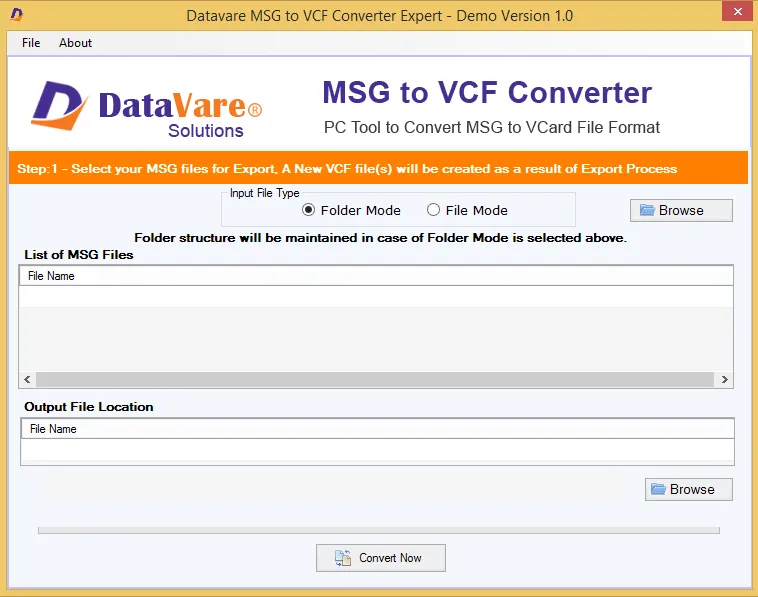
MSG to VCF Converter Expert software interface screenshot showing conversion process
MSG to VCF Converter Expert Interface

What Clients Say

This MSG to vCard exporter is actually the software I was looking for quite some days. I am not so tech savvy but I can operate the app without any help. Conversion speed is good, faced no problem in achieving accuracy.

Overall good program for those who want to access MS Outlook contacts on multiple platforms. It is straightforward, helps to get migration without going through lengthy process.