
EDB Recovery Tool

Total Ratings: 200 - Average Rating: 4.8 out of 5
  • Recover deleted emails from Exchange Server
  • Save Recovered Exchange mailboxes to PST, MSG, HTML, VCF, EML, etc.
  • Repair multiple corrupt EDB files
  • Maintains Folder Hierarchy while recovering EDB files
  • Export recovered Exchange mailboxes to Live Exchange Server and Office 365
  • Quick scan and preview of EDB files
  • All Exchange Server and MS Outlook versions are supported
  • Expert in recovering dismounted and corrupted EDB items
  • Free Exchange Recovery Software for all users

Prominent Features of Exchange Database Recovery Tool

MSG to EML Converter features icon

Recover Exchange mailbox items

Datavare EDB Recovery Software is a well-versed solution for swift recovery of Exchange mailbox items that are corrupt. This application instantly scans Exchange EDB files and recover private & public both folders of Exchange Server.
features

Recover deleted, corrupted & dismounted items

The Exchange Recovery Software easily recover deleted items like emails, contacts, notes, calendars, etc. from corrupt files. It smartly recover Exchange mailboxes from dismounted EDB files without any data loss issues.

features

Save recovered data into PST file

Users can save Exchange mailbox items like emails, contacts, calendars, etc. into Outlook PST file. Apart from this, EML, MSG, VCF, HTML, etc. formats are also supported by the software for saving Exchange mailbox items after their recovery.

features

Save attachments separately

The program allows users to save email attachments into a single folder. Many times, users need to access all attachments at one place then this tool help users to save all attachments with Exchange mailboxes into a separate folder.

features

Perform saving of Exchange mailboxes to Office 365

Users can easily migrate Exchange mailboxes to Office 365 cloud environment using this application. This helps users to access Exchange Server data items over cloud at any time and from any location.

features

Export EDB file to Live Exchange after recovery

Users are allowed to export EDB mailboxes into Exchange Live Server. By mapping source and destination address, Exchange mailbox items are exported to Live Exchange Server’s mailboxes.

Frequently Asked Question

No, Outlook installation is not required to save Exchange mailbox items into PST file.

Yes, selected mailboxes are exported into Office 365 from Exchange Server.

Yes, using Datavare EDB Recovery Software, one can recover public folder of mailbox stored in Exchange database.

No, there is no size limit for EDB file. Users can recover multiple mailboxes from corrupt EDB file.

Software Specifications

System Requirements

Processor Any Pentium Class
Operating System Windows 11, 10, 8.1, 8, 7 & Other
Memory 512 MB Minimum
Hard Disk 100 MB of free space for software installation

Software Delivery

Electronic Via Email
Minutes 15

Interface Available

Language Supported English
Support Option Emails, Chat & Skype

Software Screenshots

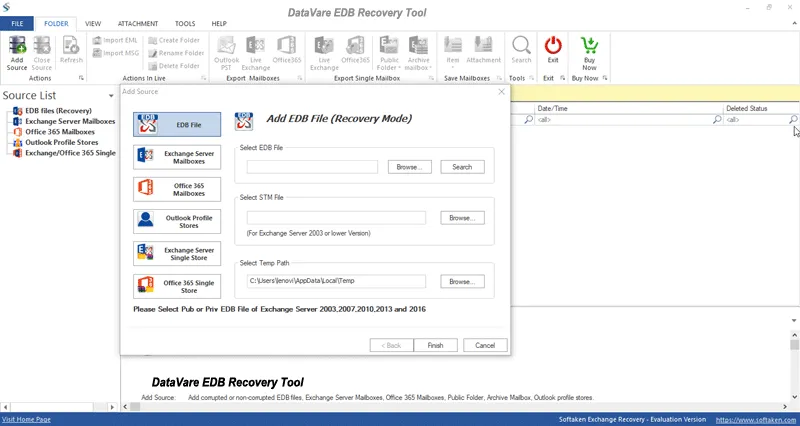
EDB recovery Converter Expert software interface screenshot showing conversion process

What Our Clients Say

Real feedback from satisfied customers worldwide

The software works fine without any trouble. It previewed Exchange mailbox items and helped me to recover corrupt EDB files. High recommendations for this software!

For me, this tool was like a blessing when my EDB files are corrupt and I was searching for an instant solution to recover those EDB files. I would suggest this EDB Recovery Tool to all needful users.