
As we know, emails play a vital role in communication; nevertheless, managing emails can become troublesome sometimes. For example, you are using Outlook for Mac and now need to shift to another email client like Apple Mail, Thunderbird, Postbox, or Betterbird, all of which use the MBOX file format. Microsoft Outlook for Mac stores emails and other information, such as attachments, contacts, calendars, notes, and journals. However, OLM is a proprietary mailbox format used by Microsoft Outlook for Mac and is not supported by Betterbird directly. Therefore, if you want to migrate Mac OLM to Betterbird, you must convert OLM files into MBOX format, which is supported by Betterbird and other email clients. The main purpose of this blog is to provide a complete guide on how to migrate Mac OLM data to Betterbird by converting OLM files into MBOX format.
Also read: Move Mac Outlook OLM file to Apple Mail?
Understanding OLM and MBOX File Formats
OLM: This is a vendor-specific format used by Microsoft Outlook for Mac. It manages all the email data on macOS. All the items, like emails, attachments, contacts, and more, are stored in OLM file format.
MBOX: This is a standard file format for storing email messages in a single text file. The file format is commonly used by many email clients like Mozilla Thunderbird, Apple Mail, Eudora, Opera Mail, and more.
Some of the Common Reasons for Migration
Before starting the migration process, let’s understand the common reasons for migration.
• One of the most basic and common reasons is that OLM is a platform-specific format of Microsoft Outlook for Mac. However, MBOX is a platform-independent format that allows users to access data in multiple email clients such as SeaMonkey Mail, Postbox, Entourage, and more.
• MBOX is an open-standard format and easier to store for long-term backup; on the other hand, Mac Outlook Data File is a vendor-specific format, which is difficult to store outside the Mac Outlook.
• When users need to migrate their data from Mac Outlook to Windows Thunderbird / Gmail / Apple Mail. Most non-Outlook clients need MBOX conversion since OLM cannot be loaded natively.
• Several programs for data analysis, content search, and email recovery can read MBOX files.
• To protect email data, users often convert OLM to MBOX while switching from Mac to Windows or Linux.
• Archiving in open formats, such as MBOX, guarantees long-term accessibility for business compliance.
Methods to Migrate Mac OLM to Betterbird
There is no direct method to migrate Mac OLM to Betterbird. However, Betterbird is an email client that supports the MBOX file format; you need to migrate the OLM file into MBOX format. Here are some alternative conversion methods. The manual method converts the entire mailbox, and it is a free solution with some limitations, but the professional method provides smooth, secure, and successful conversion.
Manual Method
Step 1: Export Mac Outlook’s OLM Data
- Launch the Mac version of Microsoft Outlook.
Next, choose File → Export. - Choose the information you want to export:(Emails,Contacts,Calendars,Activities)
- Select the Export to OLM option.
- Save the .olm file to the desktop of your Mac.
Step 2: Use Apple Mail to convert OLM to MBOX
Betterbird supports MBOX but is unable to import OLM directly.
- On your Mac, open Apple Mail.
- Select Import Mailboxes under File.
- Select OLM-formatted files.
- Choose the Outlook OLM file that was exported.
- Emails will be imported into a local inbox using Apple Mail.
- Apple Mail mailbox export in MBOX format:
- Choose Mailbox > Export Mailbox → Save as MBOX after selecting the mailbox.
Step 3: Use Betterbird to import MBOX
- Launch Betterbird.
- To import mail from an MBOX file, choose Tools → Import.
- Browse and select the converted MBOX file.
- Emails will be imported into a new local folder by Betterbird.
Step 4: Confirm Data Imported
Verify that every email, folder and attachment has been imported properly.
If required, rearrange the folders.
Drawbacks of Manual Techniques
• Time-consuming Process
• Emails Only (Limited Data Types)
• Risk of Data Loss or Corruption
• Folder Structure May Change
• Technical Knowledge Required
Professional Method
If you are facing issues in manual migration, such as time-consuming, limited to emails, prone to structural changes and data issues, and requiring technical knowledge, then try this professional method to migrate Mac OLM to Betterbird. The DataVare OLM to MBOX Converter provides a reliable and professional solution for migrating OLM data safely. Users can effortlessly migrate their OLM file into MBOX format. Export all the data in just one conversion, which easily preserves all the components during conversion. MBOX can open in 20+ supported applications, such as Mozilla Thunderbird, Postbox, SeaMonkey Mail, Claws Mail, and Betterbird. No additional software needs to be installed. The tool provides bug-free outcomes. Maintain the folder hierarchy. Offers a free demo version to its users before purchasing its licensed version.
Steps to migrate OLM files to Betterbird Email Client
Step 1: Install the application on your system
Step 2: Launch it and open it on the system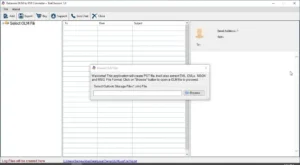
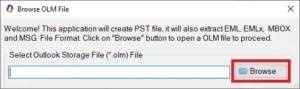
Step 3: Click the Browse option and select the OLM file from your local storage
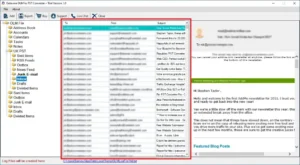
Step 4: After importing the data, take a preview of the data before migrating it
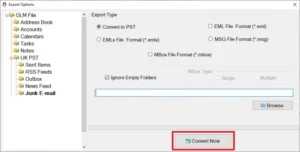
Step 5: Choose the file format in which you want to migrate. For example, MBOX
Step 6: Search the location where you need to store your data
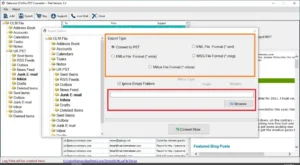
Step 7: Click “Convert Now” right away
Frequently Asked Questions
What is the easiest way to migrate OLM files to Betterbird?
Using a professional email migration tool is the easiest and safest way to migrate OLM files to Betterbird, especially when dealing with large or multiple mailbox files.
Does this tool preserve the data properties after migration?
Yes, this tool safely preserves all data properties after conversion.
Is there a demo version available?
Yes, this tool provides a free demo version for users, so that they can test the application before buying it.
Conclusion
In conclusion, there are two ways to migrate Mac OLM data to Betterbird: manually or with the help of a professional solution. The manual approach has many stages and has drawbacks, including the possibility of data loss and structural changes, even if it works well for tiny mailboxes and sporadic transfers. Conversely, a specialized tool such as a reliable email migration tool streamlines the procedure by guaranteeing a mass transfer that is accurate, quick, and free of technical issues. As a result, customers may choose the approach that best suits their needs for transfer, technical know-how, and data volume.