
DataVare PST Converter - Bulk Convert PST Files to MBOX, NSF, TGZ, EML, EMLX, MSG, HTML, MHTML, PDF Formats

DataVare PST Converter

Total Ratings: 235 - Average Rating: 4.0 out of 5
  • Delivers reliable results with complete data protection quickly.
  • Saves time by handling the batch and bulk of the Outlook PST file together in one go.
  • Easily moves PST file to multiple formats like NSF, MBOX, TGZ, EML, EMLX, MSG, PDF, HTML, IMAP and MHTML.
  • Compatible with all versions of Windows, including older and latest versions.
  • Select the start and end dates to convert a specific PST file using by Date Range filter option.
  • Keeps the structure of the folder and subfolder intact without making any changes.
  • Offers a naming convention feature for the converted email file for enhanced searching.

Key Features of DataVare PST Converter

Fast Batch Migration feature icon

Fast Batch Migration

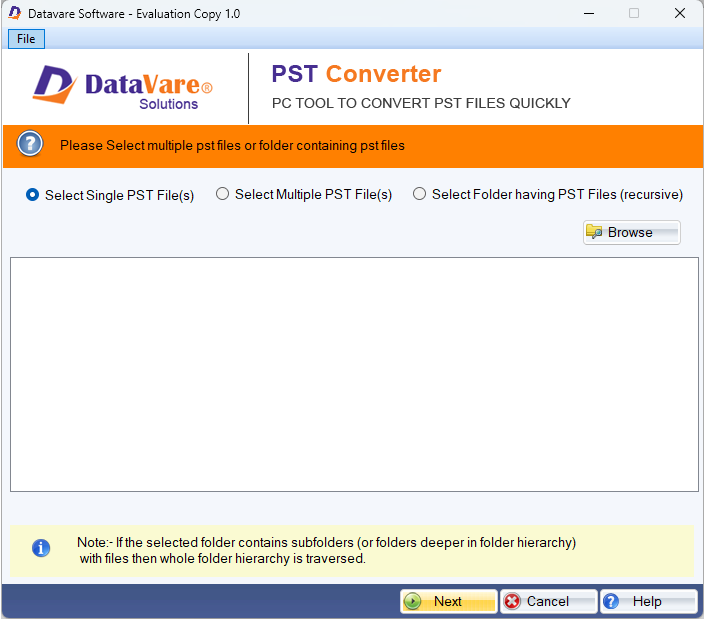
This tool offers a file and folder mode option through which you can select either a single file or a folder full of files to convert. It can easily move multiple PST files to the selected format, all in one go without any file size restriction.

Easily Multi-File Type Conversion feature icon

Easily Multi-File Type Conversion

With this utility you can swiftly convert your Outlook PST to numerous other formats like NSF, EML, EMLX, MSG, MHTML, TGZ, IMAP, HTML and PDF with just one click while keeping all your data intact.

Filter Emails by Date feature icon

Filter Emails by Date

If you want a faster and managed output, this feature will be a big help as you can set a data range to convert emails, and this tool smartly converts the messages that fall under that chosen period only for efficient workflow.

Keep Folder Structure Intact feature icon

Keep Folder Structure Intact

This professional utility ensures that all your folder and sub-folder emails, structure, attachments, properties, and hierarchy are maintained without any modification in the original file data throughout the process for simpler searching after the conversion.

Make an Error Tracking File feature icon

Make an Error Tracking File

This advanced tool smartly records detailed error logs whenever a conversion of a PST file occurs during the process. This feature makes it easy to spot the problematic files and provides a solution to fix them.

Define the Name of Output Email File feature icon

Define the Name of Output Email File

you can custom-name your resultant file during the conversion to keep all your converted PST file emails well organized and easy to access. Later you don't have to worry about what your file was named and where it's stored as you can also create a fresh file.

Frequently Asked Questions

Yes this utility can handle multiple Outlook PST files at the same time without any file or data corruption.
Yes you can transform your PST file to numerous other formats such as IMAP, EML, HTML, MBOX, PDF, EMLX and MHTML without any issue.
Yes it will work on your PC with the Windows Operating System trouble-free. It supports all the editions of Windows whether older or newer.
Yes, it will stay the same as it was in the original file, as this tool doesn't alter any of the content of the files throughout the conversion process and guarantees complete data security and integrity.

Software Specifications

System Requirements

Processor Any Pentium Class
Operating System Windows 11, 10, 8.1, 8, 7 & Other
Memory 512 MB Minimum
Hard Disk 100 MB of free space for software installation

Software Delivery

Electronic Via Email
Minutes 15

Interface Available

Language Supported English
Support Option Emails, Chat & Skype

Software Screenshots

DataVare PST Converter software interface screenshot showing bulk conversion of PST files to multiple formats with batch migration and date range filter options
DataVare PST Converter Interface - Bulk Migration Tool

What Our Clients Say

Real feedback from satisfied customers worldwide

I really like this tool interface as it's clean and self-explanatory I don't need to wreck my brain just to understand its function and the process of the conversion. All I did was follow the process step by step, with just a few simple clicks, and I was able to convert all my PST files to HTML format without corrupting or missing any of my data.

I have a bunch of very heavy PST files which I was in desperate need to convert into EML formats for better management and platform compatibility, and I, as a novice in tech I don't know how manual methods work, so I decided to invest in this tool, and trust me, it works fabulously. It converted all my files within a few minutes without modifying my original data. Loved this tool!