
DataVare OST Converter - Professional email conversion and recovery tool

DataVare OST Converter

Total Ratings: 647 - Average Rating: 4.7 out of 5
  • Supports advanced batch processing to handle multiple OST files concurrently.
  • Seamlessly compatible with all modern and legacy Windows operating systems.
  • Preserves complete mailbox hierarchy for structurally accurate and organized output.
  • Built-in date-range filter for extracting only time-specific email datasets.
  • Provides flexible naming conventions for generating consistently structured, easy-to-manage output files.
  • Automatically generates detailed error logs for transparency, diagnostics, and technical analysis.
  • Ensures 100% secure, lossless conversion with guaranteed data integrity and zero corruption.
  • It effortlessly protects all the data during and after the conversion process.

Key Features of DataVare OST Converter

Multiple format conversion feature icon

Convert and Recover Multiple Formats

With the ability to convert, recover, and efficiently extract OST files into a variety of output formats (PST, MBOX, Lotus Notes NSF, TGZ, EML, EMLX, MSG, HTML, MHTML, PDF, IMAP), the software allows for the complete extraction and conversion of email data while preserving the structure and integrity of your emails, as well as preserving all metadata, attachments, email properties, etc.

Batch migration feature icon

Support for Batch Migration

The batch migration module allows users to import and convert multiple OST files simultaneously for high-volume processing. This significantly reduces the amount of manual effort involved in large-scale migrations and greatly accelerates the migration process.

Folder hierarchy feature icon

Preserve Folder Hierarchy

By utilizing this tool, the original mailbox structure is preserved during the conversion of OST files to PST format. As a result, the structure and arrangement of folders and subfolders, as well as the order of emails in the original mailbox, are not modified during conversion, allowing for more efficient navigation within the newly created export files.

Date filter feature icon

Date Filtering

Organize your work more efficiently and selectively by using a date range filter. Extract only emails from a specific range of dates, enabling you to target specific audits, compliance issues, or chronological organization of email data.

Name convention feature icon

Custom Naming Convention for Emails

Whether you prefer to use pre-defined naming conventions or create your own, you can ensure that exported email files are organized and named in a manner that is easy to identify.

Error log feature icon

The process of creating Error Logs

Through the automatically-generated error logs, you'll maintain total visibility of the conversion process as each log not only provides you with details about what occurred when and where, but also what is creating issues so that you can take steps to fix the issues quickly and effectively.

Frequently Asked Questions

OST is a file that is created by Microsoft Outlook, which contains emails, contacts, calendars, tasks, journals, notes, and folders
It supports both old & new versions of Windows
Yes, it protects all the data during and after the conversion
Yes, you can preview your data before conversion

Software Specifications

System Requirements

Processor Any Pentium Class
Operating System Windows 11, 10, 8.1, 8, 7 & Other
Memory 512 MB Minimum
Hard Disk 100 MB of free space for software installation

Software Delivery

Electronic Via Email
Minutes 15

Interface Available

Language Supported English
Support Option Emails, Chat & Skype

Software Screenshots

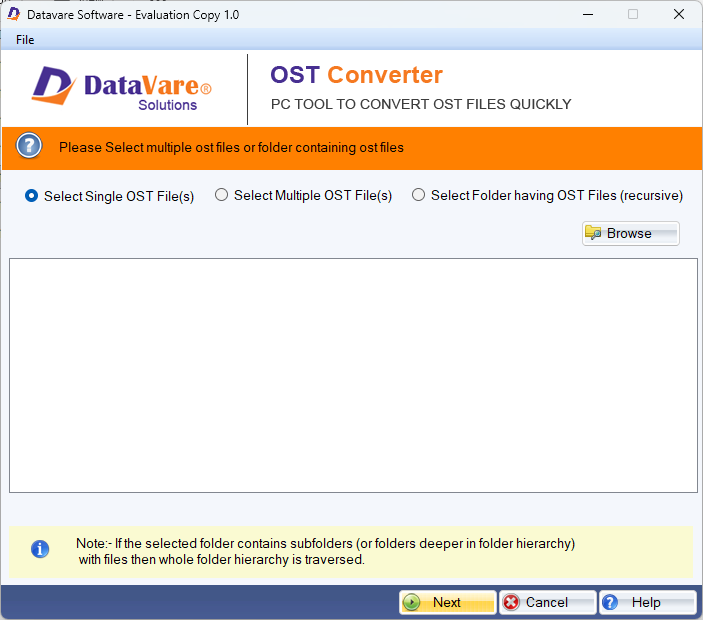
DataVare OST Converter software interface screenshot showing conversion and recovery process
DataVare OST Converter Interface

What Our Clients Say

Real feedback from satisfied customers worldwide

This tool is really useful for me because it helps to convert my data into PST format. I was struggling to convert it. But this tool makes my work so easy, no need to hassle with the manual method.

I don't have a lot of technical knowledge, and I was not sure while using this software, but it is really best application for all my data conversion in PST format without any corruption or data loss