MSG to MHTML Converter

Total Ratings: 363 - Average Rating: 4.7 out of 5
  • Export multiple MSG files to MHTML format at a time
  • Convert required MSG files to MHTML file format
  • Enable users to export MS Outlook 2021, 2019, 2016, 2013, and other MS Outlook versions
  • Export MSG files regardless of the file size
  • Give users control over the conversion results
  • An advanced app for Windows 11, 10, 8, 8.1, 7, XP and Vista users

Key Features of MSG to MHTML Converter

features

Convert MSG to MHTML Entirely

The MSG to MHTML conversion is capable of convert entire MSG file data to MHTML. The utility manages to transfer hyperlinks, date, time, CC, BCC, To, From, and attachments of emails safely. No data is damaged or corrupted.
features

Export User’s Specified MSG Files

Consider the program to meet the desired conversion goal because the software exports only selective MSG files to MHTML. The utility permits users to browse local folders to search specific MSG file to upload and transfer.

features

Meet Bulk Migration Goal

The MSG to MHTML is a well suitable app when you have requirements of converting single or multiple MSG files to MHTML format. It supports to convert one, two, three, four or multiple MSG files at once.

features

Two Advanced File Filtration Features

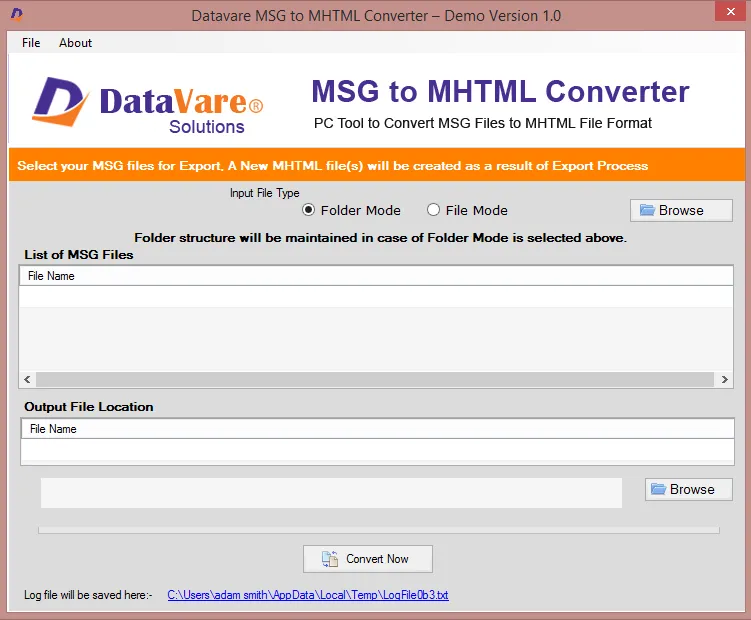
The conversion program supports two types of file filtration modes including File Mode and Folder Mode. The Folder Mode selects a folder holding MSG files, whereas the File Mode selects one file at a time.

features

A Well-Descriptive Application

The conversion solution doesn’t need you to beg for technical help because it is a well-descriptive app. The interface of the app itself indicates the steps you need to follow to meet the conversion goal. There are four prime steps.

features

An Independent Application

The MSG to MHTML is a standalone tool, doesn’t need installation of MS Outlook to migrate data. It performs conversion task independently. The tool is also lightweight, consumes a few MB data to install on your drive.

Frequently Asked Questions

Yes, you are allowed to export an orphan MSG file, but make sure the file is accessible. Only accessible files can export to MHTML.

There is no file size restriction to transfer MSG data to web browsers. The tool supports MSG files of any size.

There is no limitation set to use the program. After getting its license, you can use it as long as you want.

For our registered users we keep them well informed about the upgraded version of our apps via email.

Software Specifications

System Requirements

Processor Any Pentium Class
Operating System Windows 11, 10, 8.1, 8, 7 & Other
Memory 512 MB Minimum
Hard Disk 100 MB of free space for software installation

Software Delivery

Electronic Via Email
Minutes 15

Interface Available

Language Supported English
Support Option Emails, Chat & Skype

Software Screenshots

MSG to MHTML Converter Expert software interface screenshot showing conversion process
MSG to MHTML Converter Expert Interface

What Our Clients Say

Real feedback from satisfied customers worldwide

For non-technical users, the app is magnificent. I faced no problem in installing and converting data. The tool performs fast and accurate conversion.