MSG to G Suite Converter

Total Ratings: 368 - Average Rating: 4.8 out of 5
  • Successful conversion of Outlook single message file to Google Apps
  • Batch import MSG files to G Suite
  • Upload emails with embedded attachments
  • Straightforward and easy import process
  • Deal easily with all Windows operating systems
  • Favor Outlook 2021, 2019, 2016, 2013, 2010, 2007, and others
  • Single panel interface for easy implementation for all
  • Preserve key elements throughout the conversion
  • Outlook or any other tool installation is not mandatory
  • Convert to multiple Google Apps account with licensed edition

Salient features of Outlook MSG to G Suite Converter

features

Convert MSG to Google Apps in batch

The software allows users to import multiple MSG files into G Suite account at one time without showing any error messages. By providing correct login details of G Suite account, one can easily perform batch conversion of Outlook MSG files.
features

Self-expressive interface

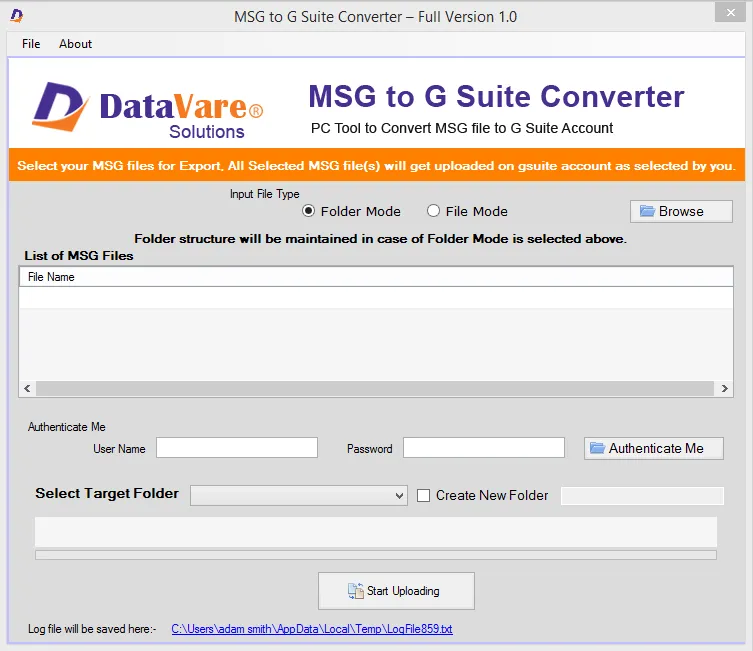
Through the self-expressive interface of the application, one can comfortably upload MSG files into Google Apps account without getting any kind of confusion. Due to the simplified interface, both technical and non-technical users execute the steps of this tool.

features

Windows-compatible program

The application is designed for Windows platforms. You can comfortably install the program on Windows 11, 10, 8.1, 8, 7, Vista, XP, and others without any interruptions. Apart from this, Windows 32bit and 64bit versions are well supported by the program.

features

Outlook installation not required

To convert MSG files into G Suite account, there is no need to install MS Outlook. Without installing Outlook, you can easily convert MSG files to Google Apps account without any kind of trouble. The application works standalone without any errors.

features

100% secure and well-tested utility

The software is 100% safe and does not save G Suite account login details in its database. Professionals have well tested the software on several parameters and the tool provides 100% successful outcomes without any corruption and damage to any file.

features

Direct conversion without data alterations

The application provides precise conversion without modifying the actual files. Users can find the folder structure intact after conversion of MSG files to Google Apps account. Moreover, the formatting and meta properties of emails are safely converted by the tool.

Frequently Asked Questions

Yes, the tool is capable enough to transfer multiple MSG files into G Suite account.

With the help of this application, one can complete the uploading in minimum time period but it depends on the speed of the internet.

No, it is not necessary to install MS Outlook to transfer MSG data files to G Suite cloud environment.

Maximum 10 MSG files are imported to Google Apps account with trial edition. For unlimited conversion facility, one needs to go for the complete edition.

Software Specifications

System Requirements

Processor Any Pentium Class
Operating System Windows 11, 10, 8.1, 8, 7 & Other
Memory 512 MB Minimum
Hard Disk 100 MB of free space for software installation

Software Delivery

Electronic Via Email
Minutes 15

Interface Available

Language Supported English
Support Option Emails, Chat & Skype

Software Screenshots

MSG to G Suite Converter Expert software interface screenshot showing conversion process
MSG to G Suite Converter Expert Interface

What Our Clients Say

Real feedback from satisfied customers worldwide

After going through many tools, I stick to this MSG to Google Apps Converter. I liked its batch uploading mode and unlimited conversion facility when I tested the demo edition. Truly a brilliant program with no shortcomings.