EML to Office 365 Converter Expert

Total Ratings: 1 - Average Rating: 5.0 out of 5
  • Import emails to Office 365 with attachments
  • Easily import EML to O365 cloud account
  • Instant connectivity to Office 365 account once login credentials are entered
  • Do not harm the actual database
  • Favor all type EML files to Office 365
  • No limitations for file size and quantity
  • 100% accurate uploading
  • Standalone EML to Exchange Online Converter
  • Suitable for both technical and non-technical users
  • Run smoothly on major versions of Windows

Remarkable features of EML to O365 Converter

features

Batch EML to O365 Import

EML to Exchange Online Converter Tool performs batch conversion of EML files which means you are free to upload unlimited EML files into Office 365 at one time. While performing the import, there is no loss and modification to original files with this tool.
features

Maintain attachments and other details

The advanced app holds EML attachments and images while converting EML data files to Office 365 account. The software preserves email formatting, meta properties and other details throughout the conversion process.

features

Convert unlimited EML files to O365

With EML to Office 365 Converter, one can convert unlimited EML files to Office 365 in a matter of few clicks. Also, the file size doesn’t matter when you are uploading the files. The tool comfortably uploads over-sized EML files without losing a single bit of information.

features

Supported email program not needed

There is no need to install any other software while you are using this application. Without support from any external too, one can comfortably transfer EML files of various email clients like Windows Live Mail, Outlook Express, Thunderbird, eM client, & others.

features

Compatible with Windows 11 & others

Feel free to download the application on all Windows. The tool is designed to suit Windows 11, 10, 8.1, 8, 7, Vista, XP, and others without any interruptions. Along with this, 32-bit and 64-bit Windows versions are supported by the tool.

features

Free demo for all

Try the demo edition of the program which is the same as the paid one in features and functioning before you apply for the license. The trial edition is free for all and is helpful in analyzing the working performance of the software.

Frequently Asked Questions

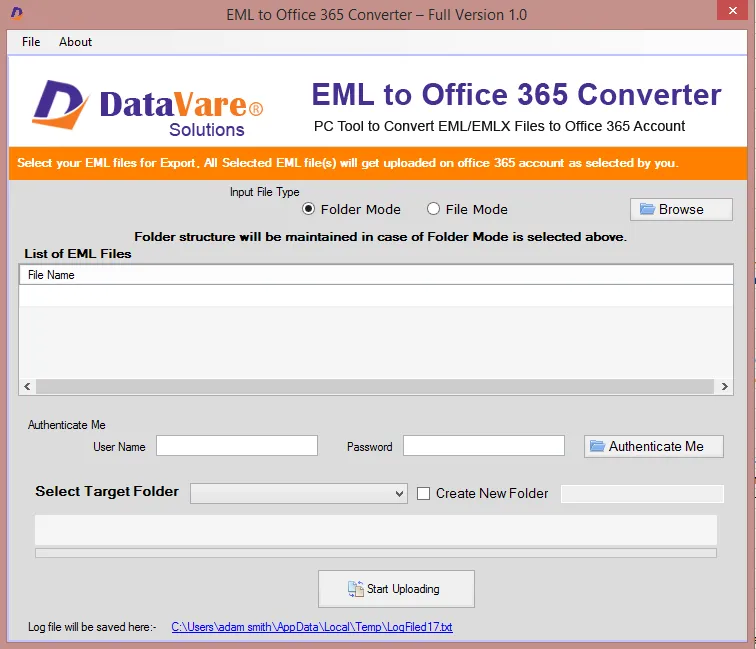
Follow the mentioned steps properly and upload EML data files to Office 365 in a few minutes –

  • Open the software and add EML files either using Folder or File mode.
  • Provide Office 365 account login details.
  • Choose the existing Office 365 account folder or create a new folder.
  • Finally, move the mouse pointer to Process button to commence the uploading task.

Yes, you can easily import unlimited emails to Office 365 environment.

No, the tool supports only healthy EML files. You can’t import corrupted or inaccessible EML files with this application.

Yes, the tool is compatible with all versions of Windows such as Windows 11, 10, 8.1, 8, 7, and others.

Software Specifications

System Requirements

Processor Any Pentium Class
Operating System Windows 11, 10, 8.1, 8, 7 & Other
Memory 512 MB Minimum
Hard Disk 100 MB of free space for software installation

Software Delivery

Electronic Via Email
Minutes 15

Interface Available

Language Supported English
Support Option Emails, Chat & Skype

Software Screenshots

Address Book Converter Expert software interface screenshot showing conversion process
EML to Office 365 Converter Expert Interface

What Our Clients Say

Real feedback from satisfied customers worldwide

Your tool helped me to easily upload EML files into Office 365 which was the toughest task for me. I was in great confusion when my senior assigned me this task. Thanks to Datavare team for this amazing program.